Sooo.. After Building My First React App and 3 quarters through my 2nd.. 🥲
Published on by Curtis King
Starting with React after working with Vanilla JavaScript
and Vue.js, I faced a steep learning curve, especially with some aspects of JSX syntax.
One of the main things that has caught me out so far is how global css can can cause conflicts when
importing mutiple components into say a main App.js component, which in this case each have their own css files.
I got REALLY stuck with this at one point, and this led me to start researching on how to overcome this.
See how I managed this, and other issues I have encountered below ⬇️
Global CSS Scoping Conflicts
When thinking about how react works at this stage in my learning, it seems this issue is created when a component, or components are imported
into a parent component, this appears to create a global scope for the child components where their css files are imported
with them, potentially creating conflicts.
After reading various articles and blog posts on this subject, I would say the main source of a resolution for me was
the blog over at logrocket.com
I had to look at the different options and ask myself which one was best suited to the situation and requirements of
my react app. I decided to go with using CSS modules on this occasion as this was best suited to the structure of my
app, though looking at deeper into some of the cons of using this method, I probably would have used an alternative route
if my app was say more complex, or had a higher amount of components.
Client-Side Routing and The Github Pages Issue 🤯
Github Pages
When I was ready to create a build version of my app to deploy to github pages, I experienced an issue when
navigating to the site url which was, the homepage or root component would not render,
leaving just the navbar rendering, and beside or below it a blank page, when cliking on Home button in the navbar or any other
navbar link, the relevant component would then render.
After trying several small alterations to the paths in my routing, changing the value of the "homepage" property in my
package.json, loads of researching, and getting to the point where I was very confused.
I eventaully stumbled on a discussion on Stack Overflow which was the closest I could find in terms of similarity
to the issue I was having which made me aware of the way that Github Pages referecnces the url during navigation,
it was best for me to wrap the
App.js component in the index.js file inside a Hashrouter instead of a BrowserRouter, and also to
add in a homepage property into the package.json who's value should point to the url of the project.
Browser Routing
One of the things I learned while working on my React project was the importance of choosing the right place
to wrap the BrowserRouter component.
Initially, I had wrapped my main App.js component inside the BrowserRouter, thinking that it would be enough to
enable routing in my app. However, I soon realized that this was not the best method, as it caused some
issues with rendering and navigation.
After doing some research, I found out that it was more correct to wrap my App component inside my
index.js file with the BrowserRouter, and then use the Routes and Route components inside my App
component to define the paths and components for each route.
This way, I was able to avoid unnecessary re-rendering of the App component and ensure that the routing
logic was consistent and clear.
This also made my code more modular and easier to maintain. I think this shows my ability to learn from my
mistakes and has helped improve my coding skills, as well as my understanding of React concepts and best practices.
Summary and 2nd React App
Through the experience of creating the first app, I've definitely taken note that
going forward I would need to plan further ahead for potential css conflicts and consider
what approach I am going to take with this before beginning development.
Aside from this I will be "levelling up" and using Vite to create my projects once my 2nd react project is complete,
as this seems to be an upgrade in terms of overall efficiency.
In my 2nd react app I have used a new and improved folder structure inside the src directory:
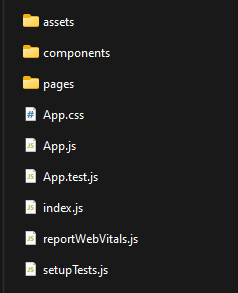
The components folder which as it says on the tin contains all the apps components. These components are each in their own sub folder with their css file. The components in this folder are mainly child components or reusable ones, such as a navbar or footer for example.
And lastly the pages folder which contains the main component for each page of the application.
I find this structure is more organised compared to my first project and easier to work with and will definitely be using it going forward.